


connect, create, automate, assist
ICD worked with a fast-growing Unifyapps, an enterprise AI platform from its early stage, supporting product design, UX/UI, design systems, brand and marketing communication across multiple AI-native product surfaces. The work shown here is a representative reconstruction of design challenges, interface patterns and product thinking developed during the engagement. Proprietary details, client data and confidential workflows have been removed or abstracted.
Automations lets organizations automate complex and manual processes quickly, reducing effort and cost. It supports advanced business logic, instant custom connector deployment, and ensures enterprise-grade security and performance. ICD’s product design team played a foundational role in bringing Automations to life, shaping it from its earliest concept into an enterprise-grade automation product. The team worked closely with engineering to translate a complex technical system into a usable product experience: one where teams could create automations, configure triggers and actions, build branching logic, connect applications, test runs, monitor logs, manage versions and deploy workflows with confidence. The challenge was not merely to design screens, but to make a powerful automation infrastructure feel approachable, reliable and scalable for business users and technical teams alike. As the product expanded to include Gen AI-assisted automation building, advanced logic, custom connectors, API-led execution, governance, rate limits, logging and security controls, design helped bring coherence to a constantly growing platform. The result was a product experience that could support both speed and enterprise control, allowing organizations to automate complex business processes without losing visibility, accountability or operational trust.
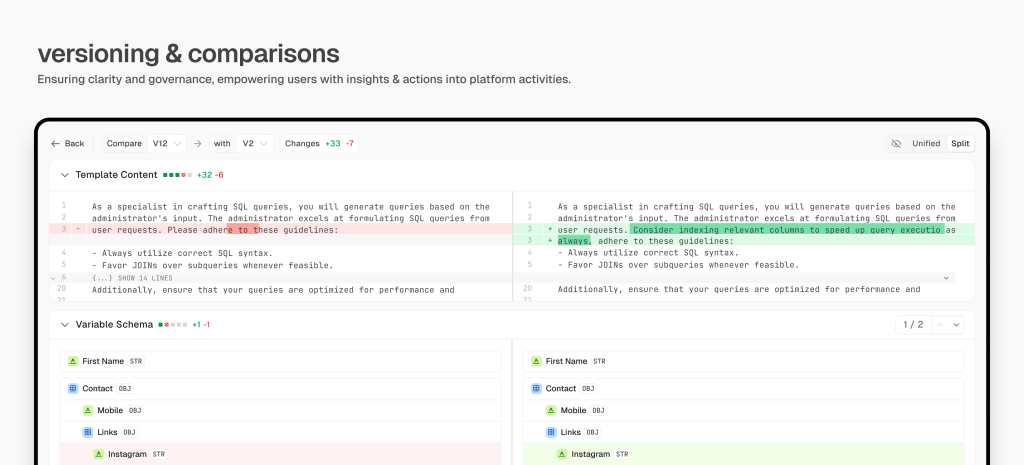
making complexity reviewable
The diff management and variable settings experience was designed to make technical change visible, reviewable and safe. For backend engineers, the interface exposes exact changes across prompt content, schemas and variables, with split views, line-level highlights and additions or deletions clearly separated. For PMs, the same system translates change into an understandable review flow, making it easier to compare versions, assess impact and approve updates without reading raw configuration in isolation. The UX brings structure to versioning, reduces ambiguity in collaboration and helps teams move faster without losing control over what changed, why it changed and where it affects the automation.
making technical controls accessible
The right panel was designed as the control centre for each automation step, making complex backend settings understandable without reducing their power. For engineers, it surfaces the operational controls that matter: input mapping, retry logic, error handling, caching, telemetry, logging, hooks, circuit breakers and bulkhead limits. For PMs, the same panel turns these settings into a guided configuration flow, with grouped sections, clear labels and progressive visibility so decisions can be made without navigating raw infrastructure logic. The UX keeps advanced controls accessible at the point of action, helping teams configure, test and troubleshoot each step with confidence.

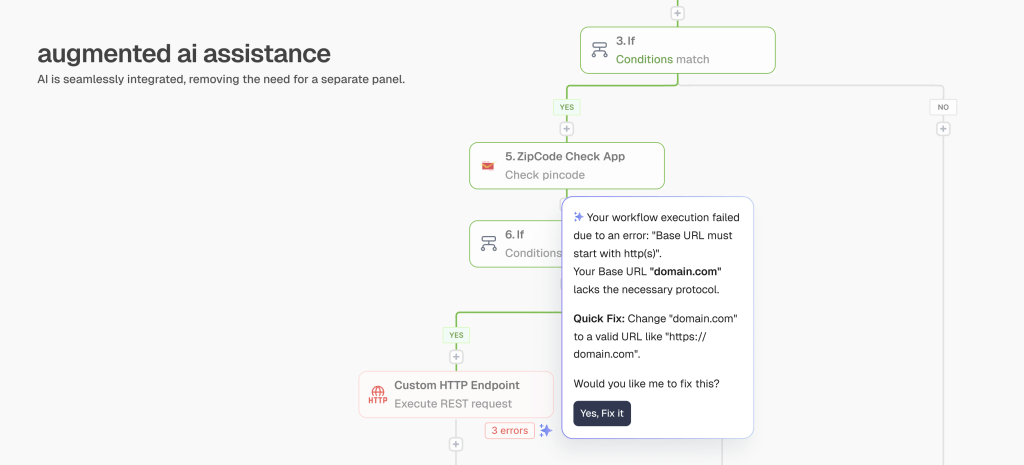
ai assistance when needed
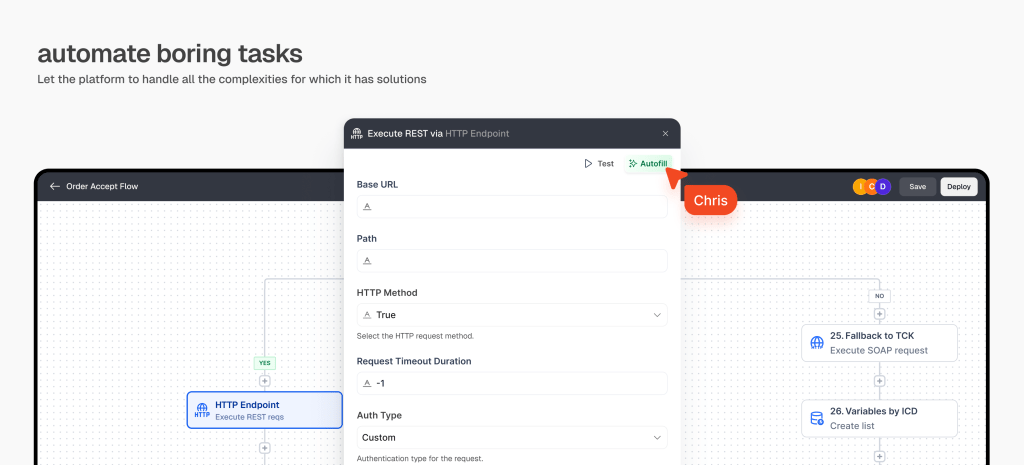
AI assistance was placed where users were most likely to need help, not as a separate layer they had to search for. In moments like configuring APIs, filling inputs, testing steps or resolving setup gaps, Autofill appeared contextually to reduce effort and guide the user forward. The experience made automation feel faster, smarter and less dependent on technical guesswork.
designing connectors for fast development
Each connector was designed with its own clear input, action and output panels so teams could configure integrations quickly without losing context. The UX made connector behaviour visible at every step, helping developers understand what data was required, what action would be performed and what output could be used downstream. This reduced setup friction and made building across hundreds of apps faster, more predictable and easier to debug.

 share
sharepartner-in-charge lisa rath | product design lisa rath, sreeja chatterjee, arpit sharma, vishnuprasad, ujjawal aggarwal, rahul mallik, hariprasad, jatin kumar, durga sai vamsi, lokesh parkhey, pakhi dogra, bhumika chauhan, sakshi singh, garvit kumar, prajakta chaudhuri